I know stuffs. Or at least some people think I do. I will try to not make an absolute mess of things. If anything it will be a giggle.
I will be live with the Twisted Nether Blogcast tonight, Thursday, April 30th at 9:30PM PST. If you want to listen into the recording you can at TNB Live Show page. The download for this new episode 42 will be available next week.
May your blades never dull.

Thursday, April 30, 2009


Tuesday, April 28, 2009
Thanks Megan
Thank you Megan of Out of Mana for all your fun blog posts over the last two years. Your wit and candidness was always something I looked forward too. Thank you for helping me understand the power and weakness of the warlock. You will be missed.
Good luck!
/bow
Good luck!
/bow
Monday, April 27, 2009
Master Angler
 After months of trying I finally won the Stranglethorn Fishing Extravaganza. I was shaking in excitement for longer then the 18 minutes it took me to win. I think the goblins finally gave it to me because I have a completely styling fishing outfit.
Now I am back to fishing in the Dalaran fountain. I have one gold coin left for that achievement.
Sunday, April 26, 2009

Friday, April 24, 2009
"I fought a lock and the lock won"
To Bobby Fullers “I Fought the Law and law won” Here is my I-had-to-much-time-on-my-hands-at-work rendition.
Stalkin’ pray in the hot sun
I fought a lock and the lock won
I fought a lock and the lock won
I thought she’d die faster then some
I fought a lock and the lock won
I attacked the lock and the idea was bad
Death coiled now I’m done
My health cursed off like I never had
I fought a lock and the lock won
I fought a lock and the lock won
Gankin squishies before they run
I fought a lock and the lock won
I fought a lock and the lock won
Fear me around and it’s not fun
Stalkin’ pray in the hot sun
I fought a lock and the lock won
I fought a lock and the lock won
I thought she’d die faster then some
I fought a lock and the lock won
I attacked the lock and the idea was bad
Death coiled now I’m done
My health cursed off like I never had
I fought a lock and the lock won
I fought a lock and the lock won
Gankin squishies before they run
I fought a lock and the lock won
I fought a lock and the lock won
Fear me around and it’s not fun
Wednesday, April 22, 2009
Screenshots the WoW Way
Screenshots in-game are easy. You press one key and your shot is saved inside a folder automatically. I didn't even look on how to figure this out until I dinged level 70, since then I have taken thousands of shots.
On your keyboard, typically on the upper right, is a “Print Screen” key. Some keyboards you only need to hit this key. Other keyboards you will have to turn on and off the function key to make it work.
While running the World of Warcraft game hit the print screen key to take an in-game screenshot. When you do yellow type with the words “Screen Captured” should flash on your screen.
If you would like to take a shot without your user interface (UI) that is easy too. Type the keys Alt+Z will hide your UI. When you want it back you type Alt+Z again.
That is it. A shot is now saved.
But where is the image?
In your World of Warcraft program file there will be folder called Screenshots. If everything is at the default places it is at “C:\Program Files\World of Warcraft\Screenshots”.
Within the screenshot folder are jpg files of what was on your screen when the print screen key was pressed.
Now you can modify the image to your delight!
I take screenshots to remind myself of potential blog posts. Sometimes they actually make it into a post, other times it is a pure reminder. I also keep the original unchanged and edit a copy just in case I, you know, mess it up.
On your keyboard, typically on the upper right, is a “Print Screen” key. Some keyboards you only need to hit this key. Other keyboards you will have to turn on and off the function key to make it work.
While running the World of Warcraft game hit the print screen key to take an in-game screenshot. When you do yellow type with the words “Screen Captured” should flash on your screen.
If you would like to take a shot without your user interface (UI) that is easy too. Type the keys Alt+Z will hide your UI. When you want it back you type Alt+Z again.
That is it. A shot is now saved.
But where is the image?
In your World of Warcraft program file there will be folder called Screenshots. If everything is at the default places it is at “C:\Program Files\World of Warcraft\Screenshots”.
Within the screenshot folder are jpg files of what was on your screen when the print screen key was pressed.
Now you can modify the image to your delight!
I take screenshots to remind myself of potential blog posts. Sometimes they actually make it into a post, other times it is a pure reminder. I also keep the original unchanged and edit a copy just in case I, you know, mess it up.
Tuesday, April 21, 2009
Malygos Warlock 3.1 Update
I confirmed it. Demonic Circle no longer pulls you out of vortex on the Malygos fight. This change made me relearn this fight. Before 3.1, I would need minimum healing because I could pop out of vortex early. This allowed my healers to focus on others in the raid.
I miss that self sufficiency.
Now I start dps at 35-40K threat, down from 50K. I may reduce that by starting dps sooner depending how the next couple of runs go.
Rogues can still use Killing Spree to get out of vortex. WHAT is that about?
It was one the few special things as a warlock we had in pre 3.1 content.*sigh*
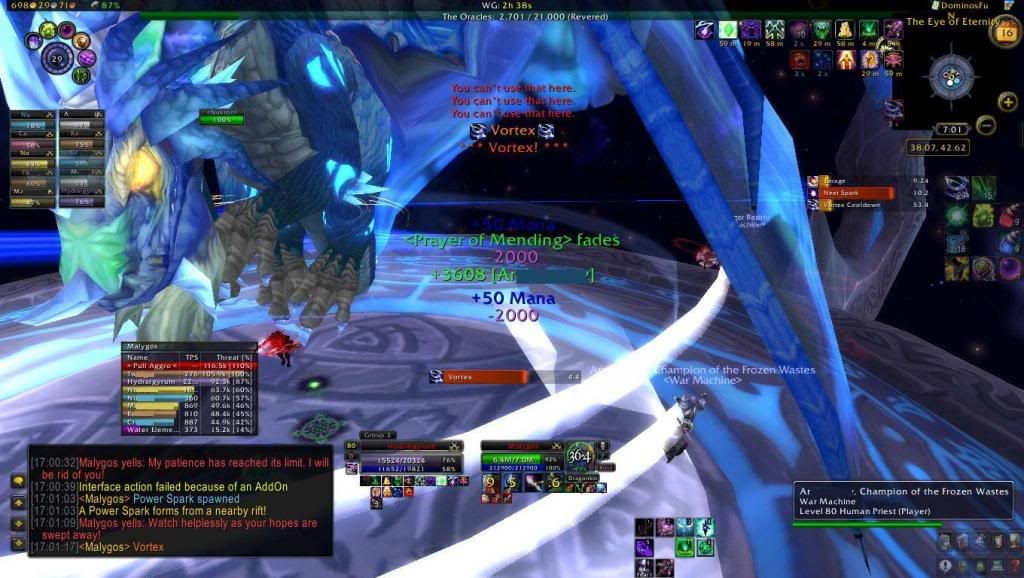 This change made me relearn this fight. Before 3.1, I would need minimum healing because I could pop out of vortex early. This allowed my healers to focus on others in the raid.
I miss that self sufficiency.
Now I start dps at 35-40K threat, down from 50K. I may reduce that by starting dps sooner depending how the next couple of runs go.
Rogues can still use Killing Spree to get out of vortex. WHAT is that about?
It was one the few special things as a warlock we had in pre 3.1 content.*sigh*
Subscribe to:
Posts (Atom)